文本属性
文本是内容,字体是用来显示内容的
缩进和行内对齐
- block 方向和 inline 方向,大部分语言从上至下,从左至右
text-indent用于块级元素,缩进发生于 inline 方向,值为长度|百分比,只缩进第一行- If you want to “indent” the first line of an inline element, you can create the effect with left padding or margin.
- 使用百分比值时,相对于包含块(父元素)的宽度
text-align:start | end | left | right | center | justify | match-parent | start end- 用于块元素,CSS Text Module Level 3 默认为
start text-align-last:auto | start | end | left | right | center | justify,用于块级元素的每个换行位置的前一行的对齐(浏览器支持)
行内对齐
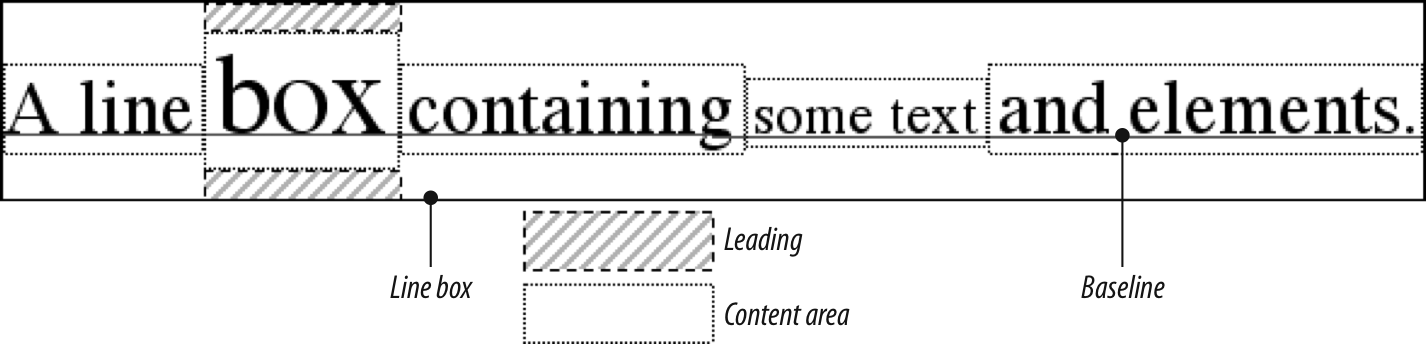
line-height设定文本 baseline 之间的间距,<number> | <length> | <percentage> | normal,百分比值时相对 font-size- leading,line-height 和 font-size 的差值
- 用于块级元素时,定义的是元素文本 baseline 的最小间距
line-height减去font-size的值等分两半放在 content area 上下,可为负值- A line box is exactly as tall as needed to enclose the top of the tallest inline box and the bottom of the lowest inline box.
line-height默认normal,用户代理设置,一般约为 font-size 的1.2倍;line-height 继承具体的值或比率 (补:严重依赖 font-families 自身设置)vertical-align用于行内元素和 image、input 等替换元素、table-cells等,不继承,使用百分比值时相对于line-height- Remember:
vertical-aligndoes not affect the alignment of content within a block-level element. You can, however, use it to affect the vertical alignment of elements within table cells. vertical-align: baseline强制元素的 baseline 和父元素的 baseline 对齐,图片、input 等没有 baseline 的将底部对齐父元素 baseline,even if there is no other text in the line.vertical-align:sub、super,baseline 低于或高于父元素 baseline,具体数值由用户代理决定,此值不改变 font-sizevertical-align: bottom把元素的 inline box 的底部与 line box 的底部对齐vertical-align: text-bottom元素的 inline box 的底部与默认 text box 的底部对齐,默认 text box 由父元素的 font-size 确定vertical-align:toptext-top与bottomtext-bottom相反vertical-align: middle元素的垂直中线与父元素 baseline 向上 1/4 em(1/2 ex)处对齐,常用于图片,baseline 向上的距离由用于代理决定,理论上可能有所不同vertival-align百分比值,元素 baseline 相对父元素 baseline 提升或降低(负值),百分比是相对于当前元素(非父元素)的 line-heightvertival-align长度数值,基于本位置提升或降低指定的长度值- 设置
vertival-align,使得元素有自己的 inline box,会影响 line box 的高度
Word Spacing and Letter Spacing
word-spacing并不总是能识别不同语言中的“word”word-spacing和letter-spacing会继承,但无法像line-height那样设置一个相对值
Text Transformation
uppercase | lowercase | capitalize | none,capitalize视用户代理实现为'Heading-one'或'Heading-One'
Text Decoration
none | [ underline ‖ overline ‖ line-through ‖ blink ]- 可联合使用:
h2 {text-decoration: underline overline;} - 元素非继承,但子元素无法使用
none清除父元素的underline等,决定于用户代理
Text Rendering
Text Shadows
none | [<length> ‖ <length> <length> <length>?]#- 两个 length,表示水平和垂直 offset,第三个可省略,模糊半径:从阴影外边缘到模糊范围边缘,具体的模糊方法由用户代理决定
- 特大范围阴影可能造成性能问题
处理空格
white-space设置浏览器对待 word 和 line 之间的空格的方式,CSS2.1 之前用于块级元素,之后用于所有元素- XHTML 多个空格合成一个,忽略元素中的换行
white-space: normal;删除多余空格,换行转换成空格,同一行的多个空格变成一个white-space: pre;像 XHTML中的<pre>,不忽略空格white-space: nowrap;防止wrap,只有使用<br>才能换行,参照 HTML4 的<td nowrap>tab-size: <length> | <integer>tab 占几个空格,用于块级元素,继承white-space设置了合并空格,tab-size会被忽略,还会被计算但不可见- 目前 WebKit and Gecko (as –moz-tab-size) 只支持
Integer
| value | Whitespace | Line feeds | Auto line wrapping |
|---|---|---|---|
| pre-line | Collapsed | Honored | Allowed |
| normal | Collapsed | Ignored | Allowed |
| nowrap | Collapsed | Ignored | Prevented |
| pre | Preserved | Honored | Prevented |
| pre-wrap | Preserved | Honored | Allowed |
Wrapping and Hyphenation (包裹和断字)
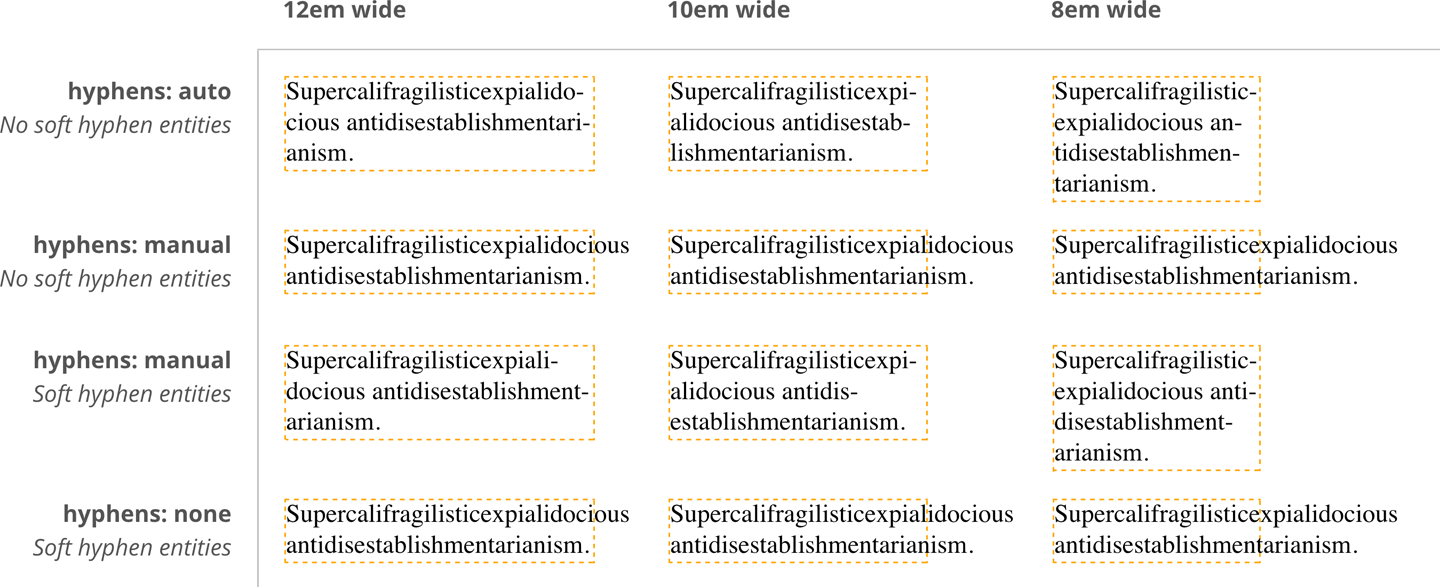
hyphens决定 word 在何处 break,高度依赖具体语言word-break:normal | break-all | keep-all- soft wrap 指文字太长,由用户代理或 OS 决定换行,
word-break可修改行为(换行符、<br>为 hard wrap) break-all时不显示 hyphens(line-break属性会影响行为)keep-all去除所有单词中的 soft wrap,行为类似white-space: pre;line-break,As we just saw,word-breakcan affect how lines of text are soft wrapped in CJK text. Theline-breakproperty also affects such soft wrapping, specifically how wrapping is handled around CJK-specific symbols and around non-CJK punctuation (such as exclamation points, hyphens, and ellipses) that appears in text declared to be CJK.overflow-wrap / word-wrap:normalbreak-wordbreak-word和word-break: break-all的区别:word-wrap: break-word当有可能使用空白断行时会使用而不会断词,word-break: break-all不管这些,会直接断单词
Writing Modes
writing-mode:horizontal-tb | vertical-rl | vertical-lr,一些细节:block 方向和 inline 方向text-orientation字体方向- direction:
ltr | rtl